

Managing physical assets is an essential part of running a business, but keeping track of them manually can be time-consuming and prone to errors. Whether it’s office equipment, machinery, or company vehicles, knowing where assets are and how they are being used is crucial for efficiency and cost control.
One of the simplest ways to manage assets is by using a QR code asset tracking system. With a quick scan, businesses can instantly access information about an asset, including its location, status, and maintenance history. Unlike traditional spreadsheets or manual logs, QR code asset management software automates the process, reducing paperwork and improving accuracy.
In this article, we’ll explore how QR code asset tracking works, why businesses are adopting it, and how it compares to other tracking methods.
What is a QR Code?
A QR code (Quick Response code) is a type of barcode that stores information in a grid of black and white squares. It can hold more data than traditional barcodes, including text, numbers, and website links.
Originally developed in the 1990s for tracking car parts, QR codes are now widely used across different industries. Businesses use them for advertising, product packaging, and digital payments because they provide quick access to information.
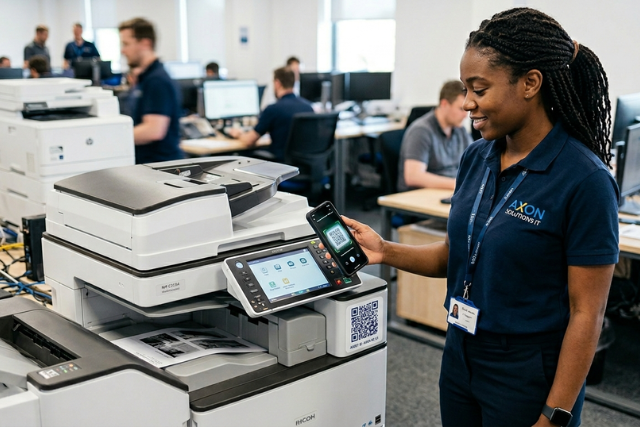
Scanning a QR code with a smartphone or scanner instantly retrieves stored data. This eliminates the need for manual entry and speeds up processes that rely on quick identification. In asset tracking, each item is assigned a unique QR code linked to a database. When scanned, it displays details like location, condition, and usage history.
What is a QR Code Asset Tracking System?
A QR code asset tracking system is a method used by businesses to track and manage physical assets using QR codes. Each asset is assigned a unique QR code, which, when scanned, provides detailed information about the asset, including its location, condition, and usage history. This system replaces traditional asset management methods like spreadsheets or manual logs, making it easier to maintain accurate records. Instead of relying on handwritten notes or outdated software, employees can use a smartphone or a scanner to instantly update and retrieve asset details.
A QR code asset management system typically consists of three main components:
- QR Code Tags – Unique QR codes are printed and attached to assets.
- Scanning Device – Employees use a smartphone, tablet, or QR scanner to scan the code.
- Asset Tracking Software – The system stores and organizes asset data, allowing businesses to monitor assets in real time.
Unlike barcodes, QR codes can hold more information, including maintenance schedules, purchase details, and user logs. This makes QR code asset tracking software particularly useful for industries like healthcare, construction, and IT, where assets need to be tracked across different locations.
By implementing a QR code asset management software, businesses can reduce asset loss, improve record-keeping, and streamline their workflow. It provides a simple yet effective way to ensure that assets are properly tracked without the need for expensive hardware or complicated processes.
How Does QR Code Asset Management Work?
A QR code asset management system helps businesses track and manage their physical assets by assigning a unique QR code to each item. When scanned, the code provides instant access to the asset’s details, such as its location, condition, and maintenance history. This simplifies record-keeping and reduces the risk of losing valuable equipment.
| Assigning QR Codes to Assets | Each asset is labeled with a unique QR code, which can be printed on stickers or metal tags. These codes are linked to a digital database where all asset information is stored. |
| Scanning and Updating Information | Employees use a smartphone, tablet, or QR scanner to scan the code. This allows them to check asset details or update records, such as noting repairs, transfers, or check-outs. |
| Storing and Accessing Data | The scanned information is saved in QR code asset tracking software, which keeps records organized and up to date. Managers can access this data from anywhere, reducing the need for manual paperwork. |
| Tracking Asset Movements | Whenever an asset is moved, the QR code can be scanned to log the new location. This helps businesses monitor equipment usage and prevent misplacement. |
| Scheduling Maintenance and Audits | With a QR code asset tracking system, businesses can set maintenance reminders and track service history. This ensures assets are well-maintained and comply with industry regulations. |
Using a QR code asset management system simplifies asset tracking, improves efficiency, and reduces the risk of lost or misplaced equipment. It is useful in various industries, including healthcare (tracking medical equipment), construction (monitoring tools), and IT (managing company devices). Most QR code asset management software can integrate with inventory, accounting, or ERP systems. This allows businesses to connect asset data with financial records, improving efficiency and decision-making.
How to use QR Codes to Track Inventory
Spreadsheets go out of date. Assets move without records. Ownership becomes unclear. As inventory grows, small errors turn into costly gaps. That’s why more organizations are adopting QR code asset tracking.
Instead of relying on manual updates, teams can scan assets, update records instantly, and maintain accurate visibility using QR asset management without adding complexity. Implementing QR code inventory tracking is not just about placing labels on assets. It’s about creating a system where every scan updates real-time information and drives accountability.
Here’s how to do it effectively.
1. Set Up a QR Code Asset Tracking System
Start with a centralized QR code asset tracking system where all inventory data is stored. This system should allow you to create, update, and manage asset records in one place.
A strong QR code asset tracking software will let you connect each asset to key details such as ownership, location, status, and history. Without this foundation, QR codes become labels without context.
2. Assign a Unique QR Code to Every Asset
Each asset should have its own unique code. This is where QR code for asset management becomes powerful. Instead of relying on manual naming or tracking, each code links directly to a specific digital record. Whether you’re managing laptops, equipment, or inventory items, this ensures every asset is uniquely identifiable and traceable.
3. Label Assets Clearly and Consistently
Attach QR codes to assets in a way that is:
- Durable
- Visible
- Easy to scan
Consistency matters. Poor labeling leads to missed scans, which breaks the entire QR asset management process. For long-term use, invest in high-quality labels that can withstand wear and handling.
4. Use QR Codes to Update Asset Data in Real Time
This is where QR code asset tracking becomes operational. Every time an asset is:
- Assigned
- Transferred
- Inspected
- Returned
It should be scanned and updated immediately. This turns asset tracking with QR codes into a live system instead of a periodic audit exercise.
5. Connect QR Tracking to Asset Workflows
Tracking alone is not enough. The real value comes from connecting scans to actions. A complete QR code asset management setup should allow you to
- Trigger updates when ownership changes
- Flag missing or inactive assets
- Track usage or maintenance history
- Surface upcoming renewals or checks
This is the difference between tracking assets and managing them.
6. Run Regular Audits Using QR Scanning
Use QR codes to perform fast, accurate audits. Instead of manually checking inventory lists, teams can scan assets and verify presence, condition and location. This keeps your QR code asset tracking system reliable over time.
7. Scale with the Right Platform
As inventory grows, manual processes fail. A scalable QR code asset tracking software ensures that your system remains accurate, even with thousands of assets. This is where platforms like Strev help. They connect QR scans to lifecycle workflows, making each scan meaningful, not just recorded.
What Types of Assets Can Be Tracked Using QR Codes?
A QR code asset tracking system is versatile and can be used to manage different types of assets across various industries. By tagging assets with QR codes, businesses can keep detailed records of their location, status, and maintenance history. Here are some common asset categories that benefit from QR code asset management:
| Types of Assets | Examples | Information |
| Office Equipment and IT Assets | Laptops, desktops, and tablets Printers, scanners, and office phones Servers, networking devices, and data storage units Company-issued mobile phones | QR codes help businesses track device assignments, manage software licenses, and schedule maintenance for IT equipment. |
| Tools and Machinery | Power tools and construction equipment Manufacturing machines and assembly line tools HVAC units and facility maintenance tools | A QR code asset management system allows companies to monitor tool usage, prevent loss, and track maintenance schedules. |
| Vehicles and Fleet Assets | Delivery trucks and service vehicles Forklifts and warehouse transport equipment Rental cars and company-owned vehicles | By using QR code asset tracking, businesses can log mileage, monitor vehicle maintenance, and keep records of driver assignments. |
| Medical and Laboratory Equipment | Diagnostic machines and hospital devices Surgical tools and patient monitoring equipment Lab testing instruments and chemical storage | Healthcare facilities use QR code asset tracking software to maintain inventory accuracy, prevent misplaced equipment, and comply with safety regulations. |
| Inventory and Warehouse Assets | Raw materials and production supplies Retail inventory and packaged goods Storage containers and shelving units | A QR code-based asset management system makes it easier to scan and update inventory records, reducing errors in stock management. |
| Documents and Records | Legal contracts and financial reports Client records and employee files Research materials and patents | QR codes can be attached to document folders or file cabinets, allowing quick access to digital records linked to each file. |
| Rental and Shared Assets | AV equipment and event rentals Shared workspace furniture and devices Library books and academic resources | Businesses that rent or share assets use QR code asset management software to track check-ins and check-outs, reducing losses. |
QR Codes vs Traditional Barcodes for Asset Management
Businesses looking to improve asset tracking often compare QR codes and barcodes to determine which system works best. While both serve the same purpose—storing and retrieving asset data—QR codes offer several advantages that make them more suitable for modern asset management systems.
QR Codes Store More Information
A standard barcode can only hold a small amount of information, usually limited to a product number or asset ID. In contrast, QR codes can store much more data, including:
- Asset descriptions
- Purchase dates and warranty details
- Maintenance logs and usage history
- Web links to digital records
This makes QR codes ideal for businesses that need detailed asset tracking without relying on external databases.
QR Codes Are Easier to Scan
Barcodes require a dedicated barcode scanner, which must be aligned properly to read the code. QR code asset tracking software, on the other hand, allows users to scan QR codes with any smartphone or tablet, making it a more convenient option.
QR Codes Can Be Scanned from Any Angle
Barcodes must be scanned in a straight line, which can be difficult if the label is curved or partially covered. QR code asset management systems solve this issue because QR codes can be scanned from any angle, improving efficiency.
QR Codes Are More Durable
In industrial or outdoor settings, barcodes can become unreadable due to scratches, fading, or dirt. QR codes, especially when printed on durable labels or metal tags, are more resistant to damage and can still be scanned even if part of the code is missing.
QR Codes Can Link to Online Databases
Since QR codes can store web links, they can direct users to cloud-based QR code asset management software. This allows employees to access real-time asset updates without manually entering data, reducing errors and improving tracking accuracy.
Although QR codes offer many benefits, barcodes are still useful in some situations. For example:
- Retail businesses use barcodes for product pricing and checkout.
- High-speed scanning in warehouses may be more efficient with barcodes for bulk inventory tracking.
However, for asset tracking, QR codes provide greater flexibility, more storage capacity, and improved durability, making them a better long-term solution for businesses.
How Secure is QR Code Asset Management?
One of the main concerns businesses have when adopting a QR code asset management system is security. Since asset data is stored digitally and accessed through QR codes, companies need to ensure that sensitive information is protected from unauthorized access and misuse. Here’s how QR code asset tracking remains secure:
1. Role-Based Access Control (RBAC)
A QR code asset tracking system can be configured so that only authorized personnel can access or update asset records. Businesses can set different permission levels, allowing employees to scan assets but restricting data modifications to managers or administrators.
2. Encrypted Data Storage
Most QR code asset management software uses encryption to protect stored data. This prevents unauthorized users from retrieving sensitive asset information, even if they gain access to the database.
3. Secure Cloud-Based Systems
Cloud-based QR code asset tracking software ensures that asset data is not only backed up but also protected by advanced security measures such as:
- Multi-factor authentication (MFA) for login access
- Automatic activity logs that track who accessed or modified data
- Regular security updates to protect against cyber threats
4. QR Code Expiration and Restricted Access
For businesses that require added security, QR codes can be set to expire after a certain period or limit access to specific users. This ensures that sensitive asset details are not accessible indefinitely or to unauthorized individuals.
5. Prevention of Unauthorized Code Duplication
One security risk is the possibility of someone duplicating a QR code and misusing it. To prevent this, businesses can:
- Use dynamic QR codes that update information automatically
- Enable scanning restrictions, requiring login credentials before accessing asset data
- Monitor system logs to detect unusual scanning activity
6. Integration with Company Security Policies
A QR code-based asset management system can be integrated with existing cybersecurity policies. Businesses can train employees on secure scanning practices and implement regular audits to ensure data integrity.
Key Takeaways
A QR code asset tracking system provides businesses with a simple, efficient, and cost-effective way to manage assets. By assigning unique QR codes to equipment, tools, and inventory, companies can quickly access asset details, track movements, and update records with just a scan. Unlike barcodes, QR codes store more information, can be scanned from any angle, and are more durable, making them a better choice for long-term asset management. Security measures like encryption, restricted access, and tamper-proof labels help protect asset data, reducing the risk of unauthorized use. Whether in IT, healthcare, logistics, or construction, businesses that adopt QR code-based asset management can improve efficiency, reduce asset loss, and maintain accurate records without relying on outdated manual tracking methods.